• PUBLISHED
  • INTERIORS
  • LIFESTYLE
  • FOOD
  • INFO +
    • ABOUT
    • SERVICES
    • FAQ
  • NEWS
  • CONTACT
  • Menu

Janet Kwan - Interior & Lifestyle Photographer

  • PUBLISHED
  • INTERIORS
  • LIFESTYLE
  • FOOD
  • INFO +
    • ABOUT
    • SERVICES
    • FAQ
  • NEWS
  • CONTACT

Contact
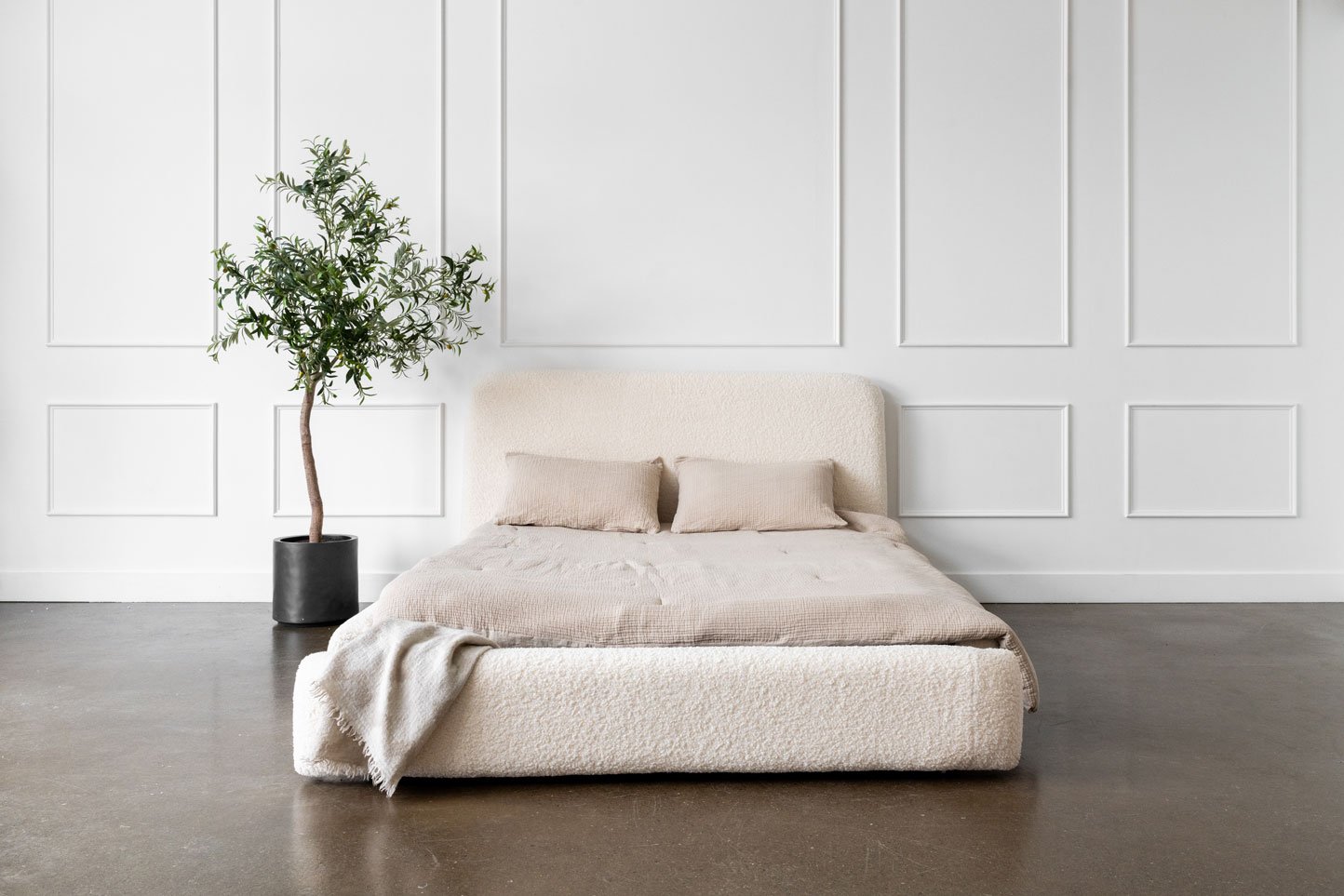
A white boucle fabric bed sits in a large room with an olive tree beside.

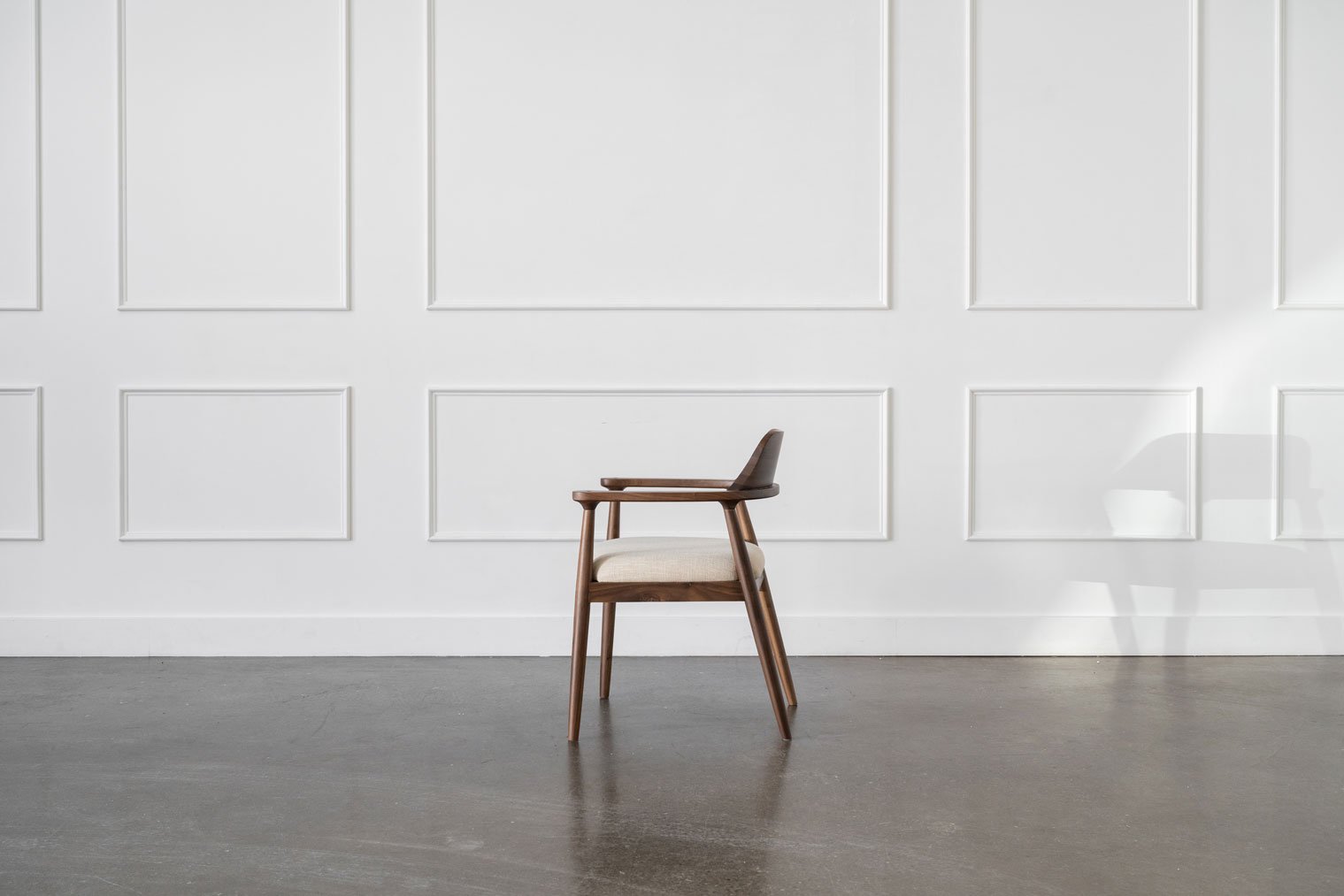
Product: Mim Concept (Lewis bed and Sophie dining chair)

June 07, 2024 in Commercial

Every piece from Mim Concept has a story behind it. Their latest products, the Lewis Teddy Bear Storage Bed was inspired by the founder’s new journey into motherhood. And as with all of their beds, there’s built-in storage and in this case, it’s seamless and hidden.

We photographed the bed from different angles to give you an idea of what it looks like, relative to the space. We also show the storage drawer closed and open so you can see how it works.

Mim Concept also released a new dining chair, Sophie. We show each product as a whole, then we move in and highlight its features.

Take a look at some of the photos below:

An infant sleeps on a white boucle fabric bed sits in a large room with an olive tree beside.
A blanket hangs on the drawer of a white boucle fabric bed sits in a large room with an olive tree beside.
A three-quarter angle of a white boucle fabric bed sits in a large room with an olive tree beside.
A three-quarter angle of white boucle fabric bed sits in a large room with an olive tree beside. The underbed drawer is open.
An underbed storage drawer of a white boucle bed is open
A close up of a white boucle headboard. Two pillows and a blanket lay on top.
A close up of a white boucle headboard.
Mim Concept's brown Sophie dining chair sits in a large empty room.
A side view of Mim Concept's brown Sophie dining chair sits in a large empty room.
A close up of Mim Concept's brown Sophie dining chair sits in a large empty room.
A close up of the backrest of Mim Concept's brown Sophie dining chair.
A three-quarter angle of Mim Concept's brown Sophie dining chair sits in a large empty room.
Featured
gotamago-products-03.jpg
Oct 15, 2025
Lifestyle products: Stationery and gifts by Gotamago
Oct 15, 2025
Oct 15, 2025
Commercial: Another Day the Label
Sep 5, 2025
Commercial: Another Day the Label
Sep 5, 2025
Sep 5, 2025
Design showroom: HD+CO
Aug 12, 2025
Design showroom: HD+CO
Aug 12, 2025
Aug 12, 2025
Princess Margaret Lotto Home: LIXIL
Jun 24, 2025
Princess Margaret Lotto Home: LIXIL
Jun 24, 2025
Jun 24, 2025
Lifestyle product: hd+co
Feb 10, 2025
Lifestyle product: hd+co
Feb 10, 2025
Feb 10, 2025
Product: Mim Concept (Lewis bed and Sophie dining chair)
Jun 7, 2024
Product: Mim Concept (Lewis bed and Sophie dining chair)
Jun 7, 2024
Jun 7, 2024
Commercial: Mim Concept (Pine, oak, and walnut dining tables)
Feb 16, 2024
Commercial: Mim Concept (Pine, oak, and walnut dining tables)
Feb 16, 2024
Feb 16, 2024
Commercial: BIC ECOlutions
Feb 6, 2024
Commercial: BIC ECOlutions
Feb 6, 2024
Feb 6, 2024
Interior: WeWork Toronto
Jul 4, 2023
Interior: WeWork Toronto
Jul 4, 2023
Jul 4, 2023
Janet-Kwan_Casa-Chic_Chairs_Stools-2.jpg
Feb 24, 2023
Commercial: Casa Chic
Feb 24, 2023
Feb 24, 2023
Obasan: Organic shredded rubber pillows
Feb 14, 2023
Obasan: Organic shredded rubber pillows
Feb 14, 2023
Feb 14, 2023
Janet-Kwan_Mim-Concept-Jan2023-32.jpg
Feb 11, 2023
Commercial: Mim Concept
Feb 11, 2023
Feb 11, 2023
Tags: mim concept, furniture, lifestyle, home
Comment

Business branding: A decade of Love Lettering

May 31, 2024 in People, Business

One of the best things about photographing someone’s life and work is being able to look back at their journey over time.

I was lucky to meet Doris of Love Lettering through her sister, whose wedding I photographed over 10 years ago. She is a talented and creative handlettering artist who constantly pushes her art beyond lettering on just paper.

We’ve worked on many projects together, from creative collaborations to her published book, Extraordinary Handlettering.

Doris even created a custom piece for my wedding, which we still have to this day. She’s supported me throughout my photography career as a peer and as a friend and I’m forever grateful for her.

Congratulations on a decade of lettering, Doris! Looking forward to more creative projects together.

Doris from Love Lettering by Doris Wai sits in front of a collection of her art work.
A collection of lettered artwork by Love Lettering by Doris Wai displayed on the wall and ground.
A flatlay of a vintage lettering book and handlettered paper.
A close up of a black notebook with gold handlettering on the front that says "Draw Today"
A portrait of lettering artist Doris Wai of "Love Lettering by Doris Wai" sitting a white counch in front of a dark grey wall. Art hangs on the wall behind her alongside an LED sign that says "Artist at work".
Handlettering artist Doris Wai letters on glass with an engraving pen.
A closeup of handlettering on glass.
A closeup of handlettering on a glass champagne bottle.
Featured
Business branding: A decade of Love Lettering
May 31, 2024
Business branding: A decade of Love Lettering
May 31, 2024
May 31, 2024
Another-Day-FW-2023-web-31.jpg
Dec 28, 2023
Another Day the Label: Fall/Winter 2023
Dec 28, 2023
Dec 28, 2023
Business branding portraits: pros and cons
Jun 12, 2023
Business branding portraits: pros and cons
Jun 12, 2023
Jun 12, 2023
another-day-shop-ss-2022-web-88.jpg
Jun 10, 2022
Product: Another Day Shop
Jun 10, 2022
Jun 10, 2022
3 Tips For A Successful Business Branding Photoshoot
Feb 18, 2020
3 Tips For A Successful Business Branding Photoshoot
Feb 18, 2020
Feb 18, 2020
Lifestyle Product: La Ceiba Botanical Skincare
Jan 17, 2020
Lifestyle Product: La Ceiba Botanical Skincare
Jan 17, 2020
Jan 17, 2020
kait-eyolfson-3.jpg
Dec 3, 2019
Business Branding Portraits: Kait
Dec 3, 2019
Dec 3, 2019
mollie-makes-thekwendyhome.jpg
Sep 3, 2019
Published: Mollie Makes - At Home With...
Sep 3, 2019
Sep 3, 2019
Partnership: This Wild Heart x JJ Cole
May 22, 2019
Partnership: This Wild Heart x JJ Cole
May 22, 2019
May 22, 2019
Lifestyle: Tina + Jon
Jan 17, 2019
Lifestyle: Tina + Jon
Jan 17, 2019
Jan 17, 2019
Lifestyle: Esther + Roy
Jul 30, 2018
Lifestyle: Esther + Roy
Jul 30, 2018
Jul 30, 2018
sugar-beach-10.jpg
May 25, 2018
Lifestyle: Toronto Made Style
May 25, 2018
May 25, 2018
Tags: love lettering by doris wai, handlettering
Comment
Minimalist oasis basement powder room with soft ambient lighting and a bed of rocks under the countertop.

Oasis basement powder room (Kē Design Collective)

May 09, 2024 in Interiors

Kē Design Collective designed this basement powder room like a mini spa oasis at home. The textures of wood and stone work together to bring nature inside. The team used a combination of straight lines and curves to guide the eye to the different elements like the light vanity mirror, vessel sink, and light fixture.

Soft, warm, under cabinet lighting further adds to the relaxed ambiance. Finished with a bed of rocks, this powder room gives you a sense of calm and tranquility without leaving the comfort of your home.

Two thin pendant lights hang from the ceiling over the corner of a minimalist basement powder room. Two vases sit on the wooden countertop, highlighted by the hanging lights.
You may also like:
Featured: Designlines x HD+CO
Sep 4, 2025
Featured: Designlines x HD+CO
Sep 4, 2025
Sep 4, 2025
Design showroom: HD+CO
Aug 12, 2025
Design showroom: HD+CO
Aug 12, 2025
Aug 12, 2025
Princess Margaret Lotto Home: LIXIL
Jun 24, 2025
Princess Margaret Lotto Home: LIXIL
Jun 24, 2025
Jun 24, 2025
20250321-creative-design-therapy-kitchen-08.jpg
May 5, 2025
Two-toned kitchen (Creative Design Therapy)
May 5, 2025
May 5, 2025
Janet-Kwan_Studio-ALC_Ashdown-Family-Room-15.jpg
Apr 30, 2025
Family room: Built-in shelves
Apr 30, 2025
Apr 30, 2025
Janet-Kwan_Studio-ALC_Ashdown-wfh-office-19.jpg
Apr 29, 2025
Minimalist work-from-home office (Studio ALC)
Apr 29, 2025
Apr 29, 2025
Neutral two-toned kitchen (Studio ALC)
Apr 28, 2025
Neutral two-toned kitchen (Studio ALC)
Apr 28, 2025
Apr 28, 2025
princess-margaret-hospital-lotto-home-colour-drench-01.jpg
Apr 5, 2025
Princess Margaret Lotto Home: $9 Million Grand Prize Oakville Showhome
Apr 5, 2025
Apr 5, 2025
Refreshed coastal galley kitchen with a sun tunnel
Mar 5, 2025
Refreshed coastal galley kitchen with a sun tunnel
Mar 5, 2025
Mar 5, 2025
Lifestyle product: hd+co
Feb 10, 2025
Lifestyle product: hd+co
Feb 10, 2025
Feb 10, 2025
Spacious family kitchen (Creative Design Therapy)
Jan 6, 2025
Spacious family kitchen (Creative Design Therapy)
Jan 6, 2025
Jan 6, 2025
Primary bedroom, bathroom, and custom closet (Belynda Chen Interiors)
Nov 11, 2024
Primary bedroom, bathroom, and custom closet (Belynda Chen Interiors)
Nov 11, 2024
Nov 11, 2024
Tags: interior, basement powder room, basement washroom, ke design collective
Comment
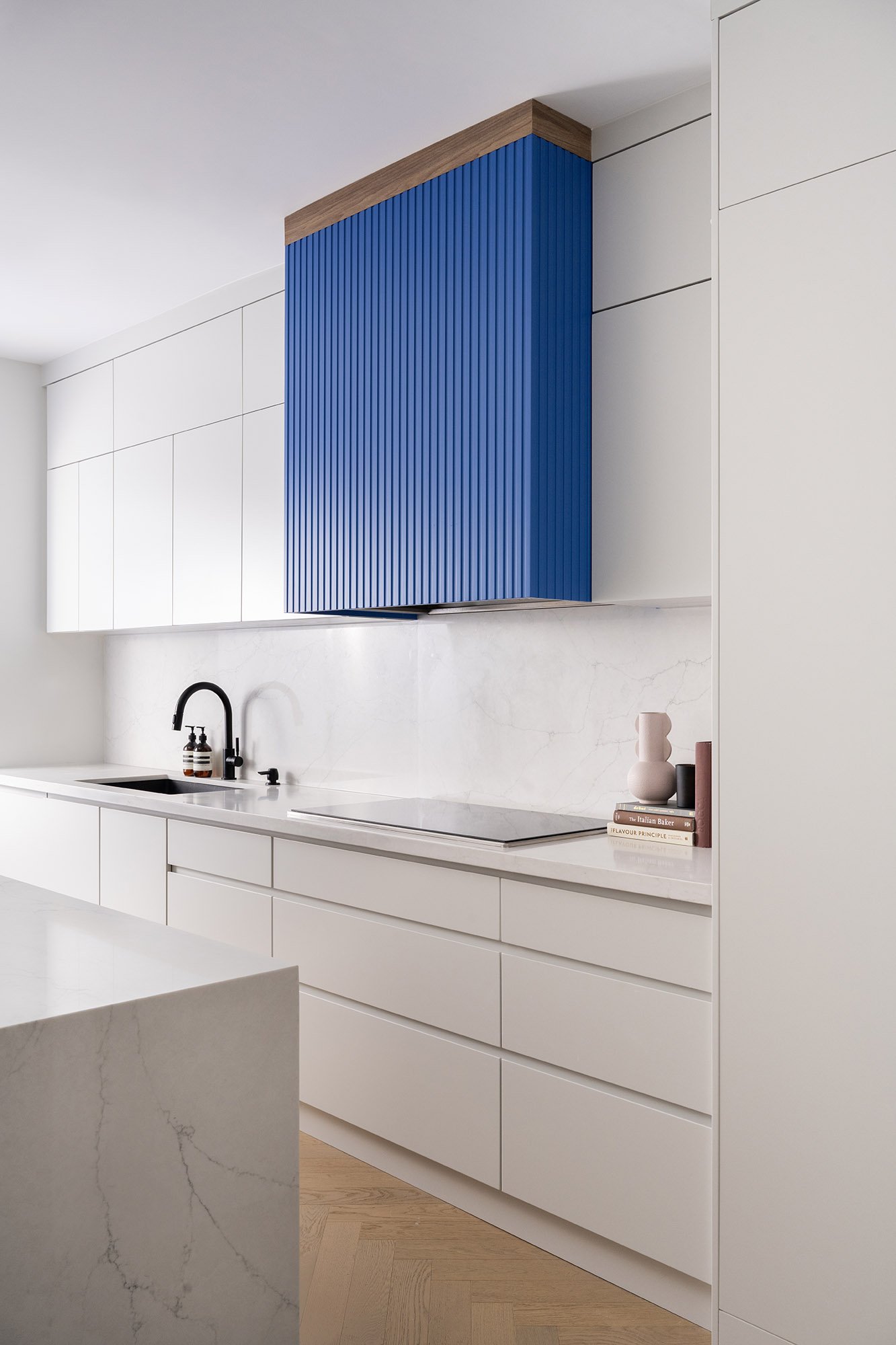
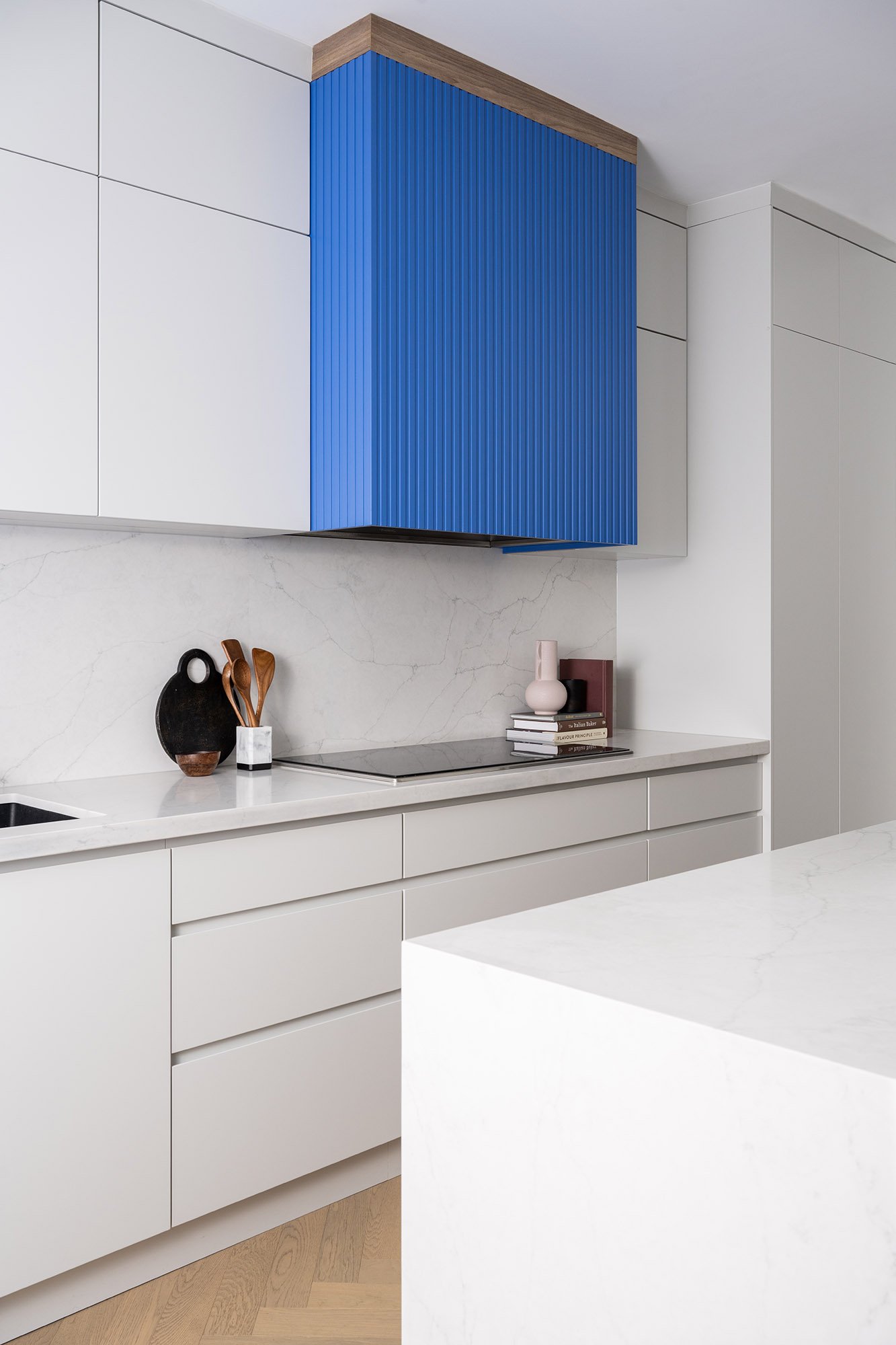
Minimalist white kitchen with a custom colour-matched blue range hood, inspired by high-top Nikes.

Custom colour-matched feature in a minimalist kitchen

May 09, 2024 in Interiors

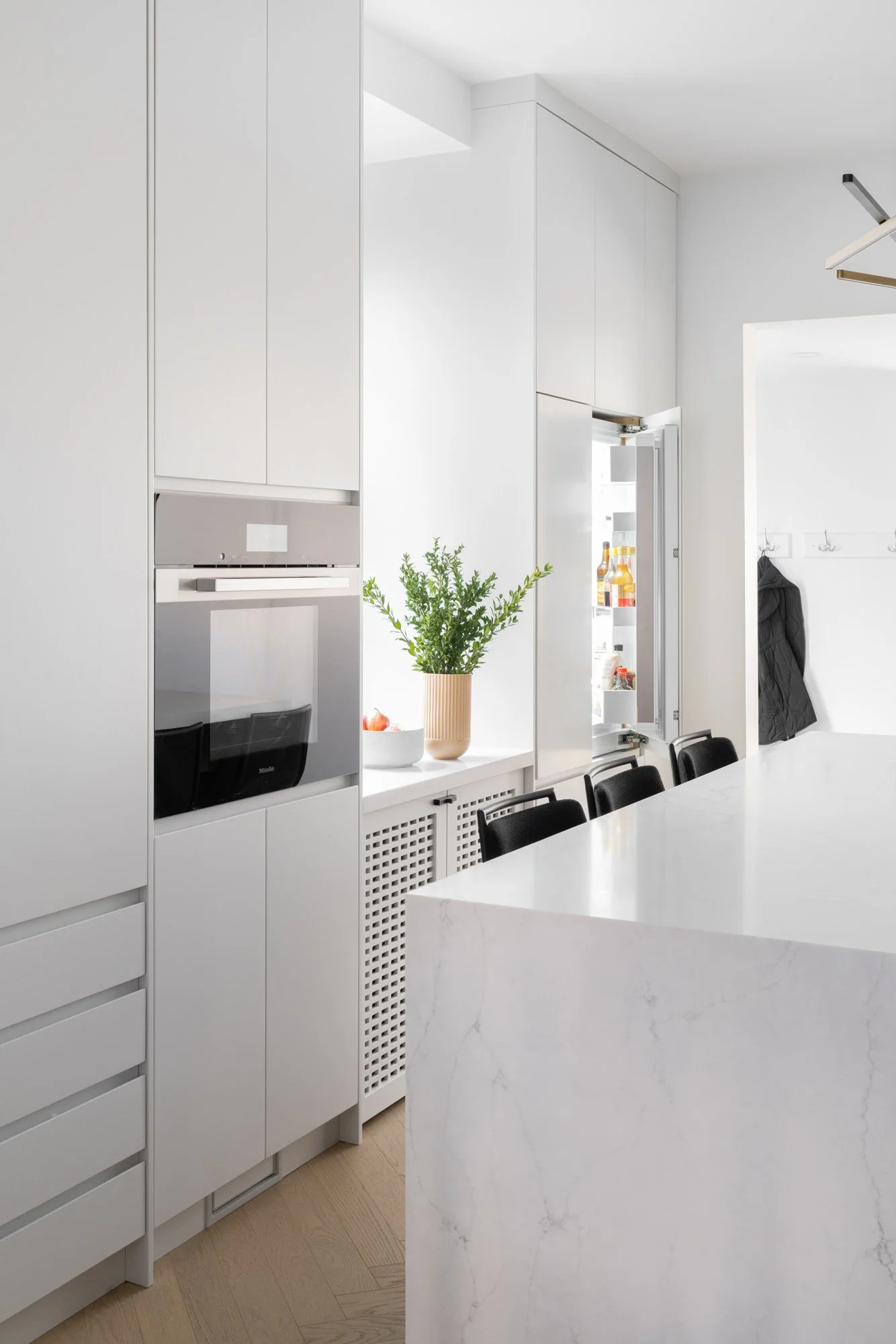
Creative Design Therapy designed this minimalist kitchen with two custom features that were meaningful to the homeowners.

The first is the range hood, created with a specific colour in mind. It inspired by one of the homeowner’s love of shoes: a pair of Nike high tops with that exact blue. The range hood was custom colour matched to the shoes to give the kitchen a unique focal point.

The second feature in this kitchen is the built-in dog crate that blends seamlessly into the kitchen’s cabinetry. It doesn’t take up any extra space and flows with the rest of the kitchen.

Minimalist white kitchen with a custom colour-matched blue range hood, inspired by high-top Nikes.
Minimalist white kitchen with a custom colour-matched blue range hood, inspired by a pair of high-top Nikes sitting on the kitchen island.
Minimalist white kitchen with a custom built-in dog crate along the cabinetry.
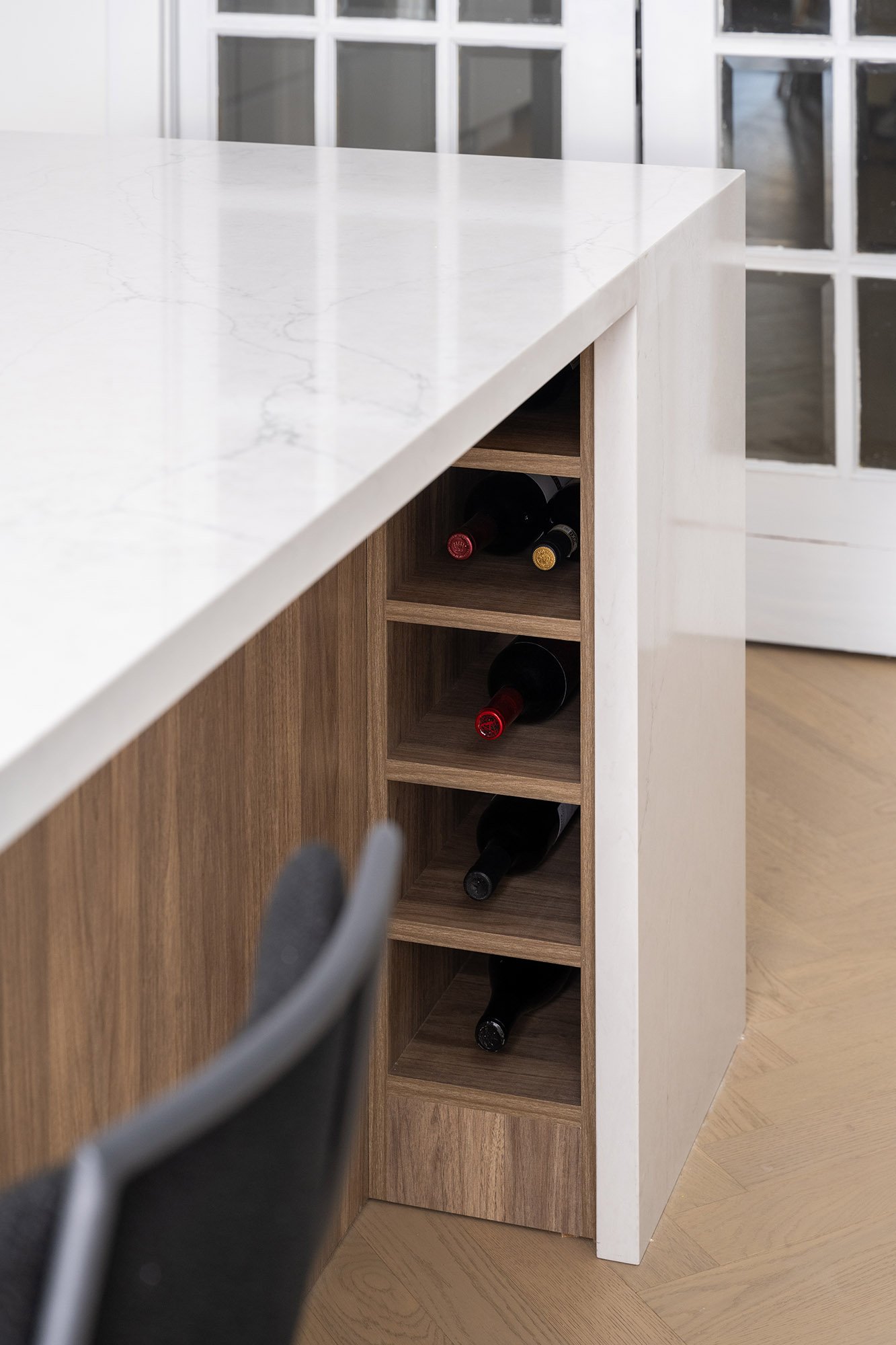
A small built-in wine cabinet under the kitchen island.
A dog in a custom built-in dog crate in a kitchen.
You may also like:
Featured: Designlines x HD+CO
Sep 4, 2025
Featured: Designlines x HD+CO
Sep 4, 2025
Sep 4, 2025
Design showroom: HD+CO
Aug 12, 2025
Design showroom: HD+CO
Aug 12, 2025
Aug 12, 2025
Princess Margaret Lotto Home: LIXIL
Jun 24, 2025
Princess Margaret Lotto Home: LIXIL
Jun 24, 2025
Jun 24, 2025
20250321-creative-design-therapy-kitchen-08.jpg
May 5, 2025
Two-toned kitchen (Creative Design Therapy)
May 5, 2025
May 5, 2025
Janet-Kwan_Studio-ALC_Ashdown-Family-Room-15.jpg
Apr 30, 2025
Family room: Built-in shelves
Apr 30, 2025
Apr 30, 2025
Janet-Kwan_Studio-ALC_Ashdown-wfh-office-19.jpg
Apr 29, 2025
Minimalist work-from-home office (Studio ALC)
Apr 29, 2025
Apr 29, 2025
Neutral two-toned kitchen (Studio ALC)
Apr 28, 2025
Neutral two-toned kitchen (Studio ALC)
Apr 28, 2025
Apr 28, 2025
princess-margaret-hospital-lotto-home-colour-drench-01.jpg
Apr 5, 2025
Princess Margaret Lotto Home: $9 Million Grand Prize Oakville Showhome
Apr 5, 2025
Apr 5, 2025
Refreshed coastal galley kitchen with a sun tunnel
Mar 5, 2025
Refreshed coastal galley kitchen with a sun tunnel
Mar 5, 2025
Mar 5, 2025
Lifestyle product: hd+co
Feb 10, 2025
Lifestyle product: hd+co
Feb 10, 2025
Feb 10, 2025
Spacious family kitchen (Creative Design Therapy)
Jan 6, 2025
Spacious family kitchen (Creative Design Therapy)
Jan 6, 2025
Jan 6, 2025
Primary bedroom, bathroom, and custom closet (Belynda Chen Interiors)
Nov 11, 2024
Primary bedroom, bathroom, and custom closet (Belynda Chen Interiors)
Nov 11, 2024
Nov 11, 2024
Tags: minimalist, kitchen, creative design therapy
Comment

How to Photograph Interiors - Part 3: Post-Processing

May 09, 2024 in Interiors, Resources

Originally published December 13, 2019
Updated May 9, 2024

If you haven’t read the first 2 parts in the How to Photograph Interiors series, you can go back and read them first:

Part 1: Preparation
Part 2: Photography
Part 3: Post-Processing

Now that we’ve covered How to Prepare for an Interior Shoot in Part 1 and The Photoshoot in Part 2, we can move onto the post-production process.

One of the best ways to keep your client’s images safe (so that you actually have photos to edit and deliver) is to be over-prepared. When packing your gear for a shoot, consider bringing a portable external hard drive and laptop with you so you can backup the RAW files immediately. This ensures that you’ll have a copy in case anything happens such as lost or corrupt memory cards, water damage, etc. and these things happen more often than you’d expect.

Shop my gear

3-2-1 Backup Strategy

As a general guideline, you can follow the 3-2-1 Backup Strategy:

Make 3 copies of the RAW files, 2 on separate hard drives and 1 offsite (eg. uploaded to the cloud or stored safely at another physical location like a trusted family or friend’s place).

Once you’ve made these backups, you can now start editing. We’ll keep this editing process minimal (ie. without using presets) so that you can understand the basics.

1. Organize your photos

Everyone has their own way of filing their photos. Once you’ve decided on what works best for you, stick to it. This is how I organize them so feel free to change it according to your needs.

After every shoot, I organize the photos by year and then by date. Here’s the hierarchy of folders on my external SSD external hard drive:

> Photography - Work
> 2024
> yyyy-mm-dd Interior - Designer’s Name (Address of Location) - Raw photos
> Final - Final high-res JPG photos to be delivered
> Web - A few selected web-resolution JPG photos to be used on portfolio/social media

(This is optional but it’s useful so you have that new work ready to update your portfolio/social)

2a. Culling

If you shoot weddings or events where you shoot a few hundred photos, it’s best to cull the set first. This means that you take a first pass through them and rate the photos to save you time when you’re actually editing.

During this process, you’re also removing the photos that are unusable (ie. out of focus, accidental shots, people caught mid-blink, etc.). Photo Mechanic is a great tool for culling because it renders previews quicker than Lightroom and has a star and colour ratings.

Develop your own system of rating but here’s an example that you can use when culling in Photo Mechanic or Lightroom:

5 stars = Excellent photo that must be delivered to the client
4 stars = Great photo technically and creatively, but not a top-pick
3 stars = Good photo technically, but not very creative and doesn’t add to the story/collection
2 stars = Ok photo, but only if needed to fill in gaps in the collection
1 star = Unusable, to delete.

Keyboard shortcut

You can also use the Pick/Reject system in Lightroom by pressing p on a photo to flag it as a pick and x to reject it.

2b. Import photos into Adobe Lightroom

Note: I have one Adobe Lightroom catalogue for all my work projects for the year. Some photographers choose to start a new catalogue for every shoot, which is helpful if each shoot has hundreds or thousands of photos. That helps your computer cut down on the time it takes to load the catalogue.

If you’re culling in Lightroom, drag all the RAW files from its folder into the Library module and start the process from there. If you’ve already culled your photos, select the RAW files you want to edit and drag them from the folder into the Library module.

Another way to do it is to go to File > Import Photos and Videos. Then navigate to the RAW files’ folder in the left panel:

 
1-import.png
 

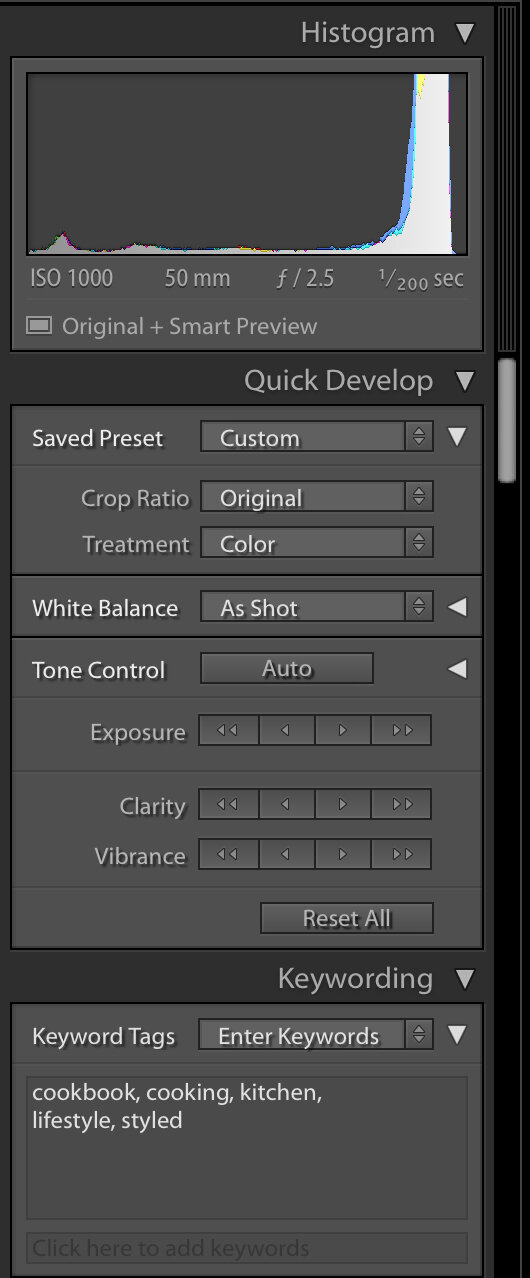
As you’re importing, add relevant keywords in the File Handling/Apply During Import panel on the right. Using metadata is important in case you want to search for a specific photo in the future.

 
photograph-interiors-part-3-library-module-right-panel.jpg
 

When the photos are imported, your Library will look like this (the photos have already been culled and flagged as Picked):

 
photograph-interiors-part-3-library-module.jpg
 

3. Develop Module

Once the photos are in the library, we can edit them. Here are a few things I’ll apply to each photo (either individually or as a batch):

Profile Correction

Check off “Enable Profile Correction” on the first image and sync this setting with all the photos. It’s located in the Lens Correction panel on the right (you may need to expand the panel). This ensures that every photo has the correct camera profile applied. Different cameras and lenses render photos differently so it’s best to turn on this correction.


Transform

With each photo, you may need to use the Auto or Vertical if the photo wasn’t level during the shoot. Sometimes, you’ll also need to manually adjust it using the sliders. Use the horizon lines in the photo and the grid in Lightroom to make sure walls are straight and floors are perpendicular.


Basic Panel

You can make most of your light edits here and deliver great photos. While you are being hired for your style and work, keep in mind the current client and the audience (who may very well include potential clients) to make sure the photos convey the right message.

Correct the white balance so that it represents the room the way you want the viewer to see it. In interior photography, I aim to keep the colours true to life and I check the before and after of the photo (using the \ key) often to do this. Depending on the interior designer, they may not mind stylized post-processing if it gives the room a specific look and feel that they want.

If the highlights in the photo are blown out, you may be able to recover some of the details by lowering the Highlights or Exposure sliders into the negatives.

To add pop to the photo, increase the Contrast bit by bit.


Tip! Watch out for negative impacts on the quality of the image when making adjustments. Be sure to compare the before and after throughout the editing process. Adjust the slider back and forth and dial it back if the effect becomes distracting (eg. too much contrast, loss of important details like highlights or shadows, colours are no longer represented accurately).

Keyboard shortcut: Toggle the before and after by pressing the \ key.


After you’re happy with your edits to one photo, you can apply these same settings to other photos in the batch that have a similar lighting and colour situation. This will save you some time, but don’t forget to review each photo to make sure they’re consistent.

When the entire set is finished, filter the photos to make sure only your final selects are shown. Select them all and go to File > Export. Go through each section and make changes as necessary. Here are some examples:

  • Save the exported photos to a specific folder.

  • Custom rename the files according to the shoot and client.

  • Change the quality and resolution of the photos according to the client and use.

 
photograph-interiors-part-3-export.jpg
 

After you’ve exported and delivered the photos to your client, make backups of your RAW and JPG files to external locations (external hard drives, cloud storage, etc.). It’s useful to have them ready to show as portfolio work.

Thank you for following along in this How to Photograph Interiors series. I hope this has been helpful!

You may also like
Featured: Designlines x HD+CO
Sep 4, 2025
Featured: Designlines x HD+CO
Sep 4, 2025
Sep 4, 2025
Design showroom: HD+CO
Aug 12, 2025
Design showroom: HD+CO
Aug 12, 2025
Aug 12, 2025
Princess Margaret Lotto Home: LIXIL
Jun 24, 2025
Princess Margaret Lotto Home: LIXIL
Jun 24, 2025
Jun 24, 2025
20250321-creative-design-therapy-kitchen-08.jpg
May 5, 2025
Two-toned kitchen (Creative Design Therapy)
May 5, 2025
May 5, 2025
Janet-Kwan_Studio-ALC_Ashdown-Family-Room-15.jpg
Apr 30, 2025
Family room: Built-in shelves
Apr 30, 2025
Apr 30, 2025
Janet-Kwan_Studio-ALC_Ashdown-wfh-office-19.jpg
Apr 29, 2025
Minimalist work-from-home office (Studio ALC)
Apr 29, 2025
Apr 29, 2025
Neutral two-toned kitchen (Studio ALC)
Apr 28, 2025
Neutral two-toned kitchen (Studio ALC)
Apr 28, 2025
Apr 28, 2025
princess-margaret-hospital-lotto-home-colour-drench-01.jpg
Apr 5, 2025
Princess Margaret Lotto Home: $9 Million Grand Prize Oakville Showhome
Apr 5, 2025
Apr 5, 2025
Refreshed coastal galley kitchen with a sun tunnel
Mar 5, 2025
Refreshed coastal galley kitchen with a sun tunnel
Mar 5, 2025
Mar 5, 2025
Tags: interior design, photography, tutorial, how to
Comment
Prev / Next

INSTAGRAM

If you’re looking for kitchen inspo, I photographed it for you. Save this or send it to someone who wants to update their kitchen 😊

When I walked into this kitchen, it felt like I was looking at my own @pinterest board in real life, from the
When say you’re going to the gym and the gym is in your backyard 🤩

This peek at a custom-built gym by @alairhomes.toronto was featured in an article in the National Post on the increase of wellness at home.

And the best part is, this is actu
When you walk into this kitchen, you’ll see it was designed for the everyday and also for gatherings. 

All that countertop space? Perfect for prepping and grazing. 

And the flow? Plenty of space to walk through from the dining room through th
There are walk-closets, but have you seen walk-through closets? This one is beautifully designed and is an efficient use of space, topped off with an arch detail to welcome you to your primary bedroom every night.

Build: @alairhomes.toronto 
Archite
Follow @janetkwan

BROWSE BY CATEGORY

Categories
  • Business
  • Commercial
  • Featured
  • Food
  • Interiors
  • Lifestyle
  • People
  • Personal
  • Resources
  • Travel